
git flow
Beginning
1.运行git
在工作空间(需要Git操作的文件夹)里运行git,可用pwd查看当前目录

使用
git init
命令,使当前目录变成可管理的仓库目录

2.添加文件
往当前目录里面添加需要上传的文件(当然有的文件也可以不上传)
例如,往文件中添加了文件readme.md,文件内容为
First try
Git is a excellent softwware.
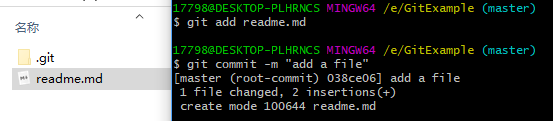
3.将文件添加到仓库
git add readme.md
执行后没有消息,这句命令是将文件添加到暂存库state
然后执行
git commit -m "add a file"
这句话的作用是将暂存库state的文件提交commit到本地仓库,其中-m后的内容是本次提交的注释,用来说明本次提交的说明
4.注意事项
git add 后面可以接多个文件名,这样可以选择性提交
例如,当前目录里面有file1.txt , file2.txt, file3.txt .目前只需要提交1和2,则
git add file1.txt file2.txt
或者
git add file1.txt
git add file2.txt
命令汇总
<<<<<<< HEAD
git clone http://xxxx.git  # clone to local repository
# after we change something
git add xxx   # xxx is the files you changed
git commit -m "change something"   # commit to repository with comment
git push origin master  # push your commit to remote repository

### The next comands are to check your status ###
git status
git log  # check commit/push node
git diff xxxx oooo  # check the differece between xxxx and oooo, generally we use
git diff origin master  # to find difference between what is commited to local and remote repository.

### cancle `git add`
git reset HEAD # cancle all what has been `git add`
git reset HEAD xxxx # cancle the `git add` file xxxx

### cancle `git commit`
git reset commit_id     # commit_id can be found in git log, the code will not change
git reset --hard commit_id    # the code will be change
git revert HEAD   # cancle last commit
git revert HEAD^   # cancle last last commit
git revert commit_id   # cancle the commit named commit_id
git revert   # commit a new version, back to old version and change it as a newest version and commit
➜  Note git:(master) ✗ $ git reset
HEAD           master         origin/HEAD    origin/master
a77a12c  -- [HEAD]    add notes (44 minutes ago)
46d9383  -- [HEAD^]   delete unnecessary repeat file (4 hours ago)
57cbdea  -- [HEAD^^]  delete unnecessary (4 hours ago)
d789e1c  -- [HEAD~3]  delete unnecessary (4 hours ago)
324a8cc  -- [HEAD~4]  add IMU (9 months ago)

### change commit comment
git commit --amend  # then it enter vim edit, change your comment and save it.

### cancle what has been pushed
git rm xxxx  # delete files that you do not need

###  if someone change the remote repository but your local repository don't update, you should use
git pull # first before you push your commit.

git checkout -b branch_name  # create a new branch and checkout to it
git checkout tag_name  # checkout to the version named tag_name
git checkout commit_id  # checkout to the version named commit_id
git apply --check xxx.patch  # check the what will happen after applying this patch
git apply xxx.patch  # apply the patch